Some years ago I wrote a guide that explained how to give support to old hardware, like tablets or old laptops and join them as real displays connected to your main PC, but it has low performance and some issues because it is old and vncserver was unmaintained.
But now we have Sunshine, a recommended game streaming server, very optimized to launch your virtual screens using Virtual Displaylink to get the same result.
This guide only wants to put some tips for Linux using Xorg to do that, because I know that Sunshine has many source possibilities and we have different GPU boards, so this guide is not for all scenarios.
Scenario
- You have unused screens, for instance an Android Tablet or an old laptop
- You have GNU-Linux (with NVIDIA it is possible that you don’t need to use the Displaylink step)
- You just want to have more screens, this guide is not for gamers (but it is possible too :D)
Virtual Screens
First, we need to add virtual screens to our X session, for instance a virtual monitor below the main monitor, which will be our Android tablet, and maybe a second screen that will be our old laptop. For that we need to generate virtual screen devices and configure them. For that we are going to use Virtual Displaylink. Please see the documentation and install it. At the end you should have something like this:
DVI-I-4-4 disconnected (normal left inverted right x axis y axis)
DVI-I-3-3 disconnected (normal left inverted right x axis y axis)
DVI-I-2-2 disconnected (normal left inverted right x axis y axis)
DVI-I-1-1 disconnected (normal left inverted right x axis y axis)
Why do we need Virtual DisplayLink and why not hacks with Xorg fake or dummy monitors?
Because the performance of the latter ones is so bad, and some programs like Firefox or MPlayer or whatever with acceleration could fail, sometimes crashing them.
Virtual Screen Config
Now, in theory you have 4 more monitors, but you need to add them to your setup, for instance using the xrandr command. Here, for instance this script could configure my Tablet space:
#!/bin/bash

MAIN_HDMI=HDMI-A-0
DVI_OUTPUT="DVI-I-1-1"
MODE="1920x1080_60.00"

config_virtual () {
  # Check if the mode already exists in the current X server instance
  if ! xrandr | grep -q "${MODE} (0x"; then
  ¦ xrandr --newmode ${MODE} 173.00  1920 2048 2248 2576  1080 1083 1088 1120 -hsync +vsync
  ¦ sleep 0.5
  fi
  xrandr --addmode ${DVI_OUTPUT} ${MODE} 2>/dev/null
  sleep 0.5
}

# this put the tablet screen below of my main screen:
enable_virtual () {
  xrandr --output $DVI_OUTPUT --mode ${MODE} --below ${MAIN_HDMI}
  sleep 1
}

# your desktop manager restart. Here for WMaker
wmaker_restart () {
  kill -usr1 `pgrep wmaker | tail -1`
}

config_virtual
enable_virtual
wmaker_restart
After that, you could use arandr command to see your final setup, for instance for me:
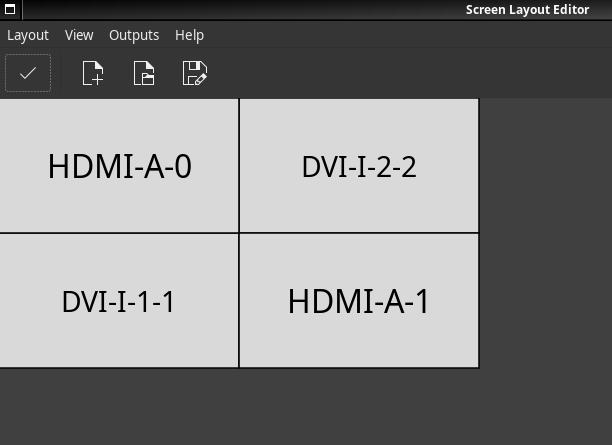
or also using xrandr you are able to see the outputs configured:
DVI-I-4-4 disconnected (normal left inverted right x axis y axis)
DVI-I-3-3 disconnected (normal left inverted right x axis y axis)
DVI-I-2-2 disconnected 1920x1080+1920+0 (normal left inverted right x axis y axis) 0mm x 0mm
   1920x1080_60.00  59.96*
DVI-I-1-1 disconnected 1920x1080+0+1080 (normal left inverted right x axis y axis) 0mm x 0mm
   1920x1080_60.00  59.96*
Sunshine server
Sunshine has many options and possibilities, but it is easy to configure. However, some things are important here:
- You will need to be able to change or open some firewall ports
- It depends on whether you have NVIDIA or AMD.
- It is important to first configure the virtual space before launching Sunshine
- In theory it works with Wayland (for me it still has many issues).
- Please try first with the default config of Sunshine
My current config:
adapter_name = /dev/dri/renderD128
capture = x11
controller = disabled
encoder = vaapi
keyboard = disabled
output_name = 5
port = 48989
sw_preset = ultrafast
sw_tune = stillimage
vaapi_strict_rc_buffer = enabled
In ~/.config/sunshine/sunshine.conf:
Tips:
portplease go to the Network Settings in Sunshine to understand which other ports and protocols you need to open in your firewall.capture = x11for me fixed many issues, but maybe it is different for you.output_nameseems to be sometimes the list number position of your xrandr output, but maybe you will need to play with that.vaapimaybe only works on AMD cards
Moonlight
Moonlight is the client of the Sunshine server. It is able to run in many architectures, like tablets or PCs. Add the host IP, type the PIN shown in the Sunshine web UI and match the client resolution (1920x1080). You don’t need many changes in Moonlight config, maybe the bitrate. I limited it to 2Mb, and it is enough for full HD.
Multiple Sunshine servers
That is optional, but it is possible to launch Sunshine many times for handling more monitors. Of course it is important to tune these instances, because Sunshine doesn’t have a heavy CPU footprint, it is very light, but with two or three virtual screens working, that means two or three Sunshine servers running, and your CPU may feel that.
For that you need to replicate your config and change the port range of each one, for instance I have this structure:
ls ~/.config/

├── sunshine
│   ├── apps.json
│   ├── credentials
│   │   ├── cacert.pem
│   │   └── cakey.pem
│   ├── sunshine.log
│   └── sunshine_state.json
├── sunshine_laptop
│   ├── apps.json
│   ├── credentials
│   │   ├── cacert.pem
│   │   └── cakey.pem
│   ├── sunshine.conf
│   ├── sunshine.log
│   └── sunshine_state.json
└── sunshine_tablet
    ├── apps.json
    ├── credentials
    │   ├── cacert.pem
    │   └── cakey.pem
    ├── sunshine.conf
    ├── sunshine.log
    └── sunshine_state.json
For that please configure one, copy the structure, and then configure the second one. Please notice that you always need a sunshine directory in ~/.config.
The config is very similar, but the difference is the port config, which means that you need to open the ports shown in each config in the Network Settings section.
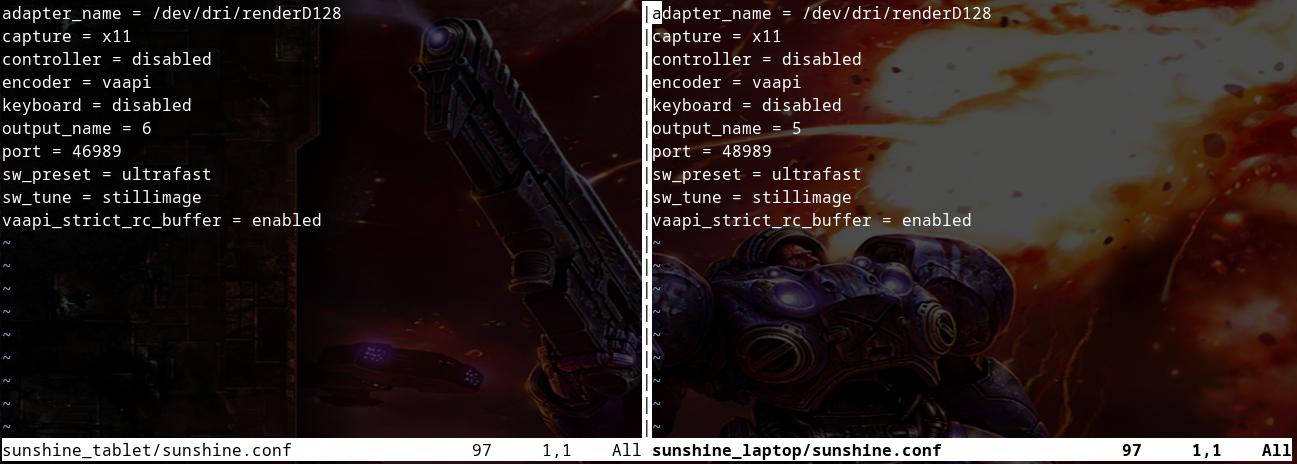
You can launch each one separately:
sunshine ~/.config/sunshine_laptop/sunshine.conf
TIP:
Sometimes you need to launch one, connect its Moonlight client and then launch the second Sunshine server, because sometimes the second Moonlight client might find the first instance of Sunshine. You can improve this by separating the network ports further.
DEMO
In this video the tablet and the laptop on the right are virtual screens of my Desktop CPU. The other screens are real screens. All working together with the same OS in different spaces.